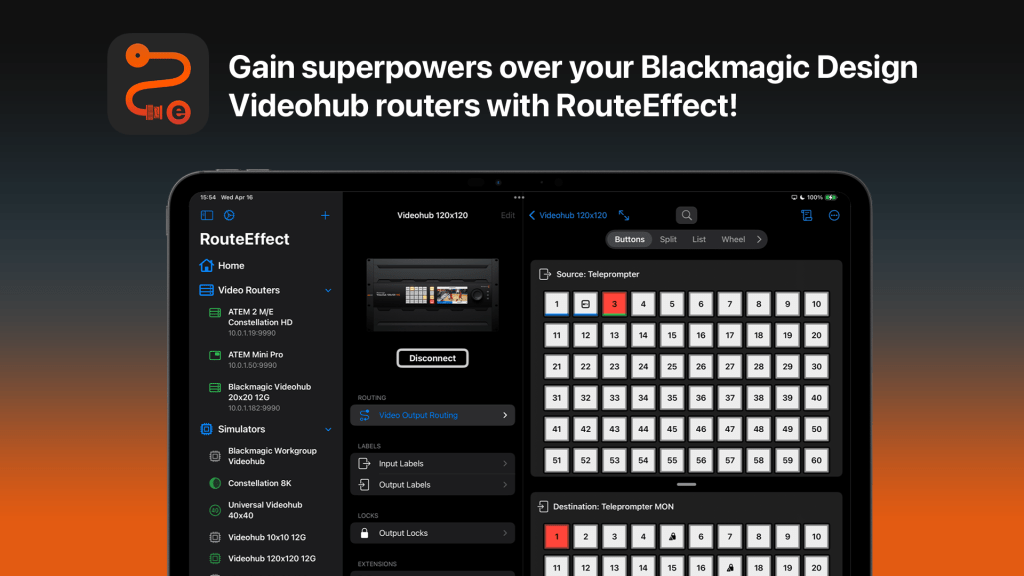
Introducing RouteEffect, a powerful new application for iOS, iPadOS, and macOS for controlling video routers such as Blackmagic Design’s Videohub routers. Whether you’re managing a compact setup with the Videohub Mini 4×2 12G or overseeing a large-scale production with the Videohub 120×120 12G, RouteEffect gives you total command over your video routing workflow.
RouteEffect does for Videohubs what MixEffect does for ATEM switchers—it gives you superpowers over your video routing, with powerful tools, intuitive controls, and unmatched flexibility.
Seamless Integration with Blackmagic Videohub 12G Routers and ATEM switchers
RouteEffect is engineered to work seamlessly with the entire range of Blackmagic Videohub routers, but also works with those ATEM live production switchers that present themselves as Videohub devices.
- Videohub Mini 12G Series
- Videohub Mini 4×2 12G
- Videohub Mini 6×2 12G
- Videohub Mini 8×4 12G
- Videohub 12G Series
- Videohub 10×10 12G
- Videohub 20×20 12G
- Videohub 40×40 12G
- Videohub 80×80 12G
- Videohub 120×120 12G
- ATEM Mini Series
- ATEM Mini Pro
- ATEM Mini Pro ISO
- ATEM Mini Extreme
- ATEM Mini Extreme ISO
- ATEM Mini Extreme ISO G2
- ATEM SDI Series
- ATEM SDI
- ATEM SDI Pro ISO
- ATEM SDI Extreme ISO
- ATEM Constellation Series
- ATEM 1 M/E Constellation HD and 4K
- ATEM 2 M/E Constellation HD and 4K
- ATEM Constellation 4 M/E HD and 4K
- ATEM Constellation 8K
- ATEM Television Studio Series
- ATEM Television Studio HD8
- ATEM Television Studio HD8 ISO
- ATEM Television Studio 4K8
Five Ways to Navigate Your Video Routing
RouteEffect provides five distinct ways to visualize and manage your Videohub routing: Buttons, Split, List, Wheel, and Crosspoint. Simply tap an output and assign it to any source. With real-time switching and instant visual feedback, RouteEffect adapts to how you want to work in the moment.

Videohub Customization with Icons, Colors, and Labels
Make your routing interface instantly recognizable. Customize sources and destinations with icons, colors, and short labels so you can identify them at a glance. This streamlines live switching, reduces errors, and improves collaboration in fast-paced environments.
Route Once, Output Everywhere
With virtual outputs, you can group multiple physical outputs and control them as a single unit. Perfect for sending the same source to multiple destinations—like multiviewers, confidence monitors, or recorders—without repeating the same route over and over.


Automate Your Workflow
Speed up your workflow with powerful presets and full Apple Shortcuts integration. Instantly recall complex routing setups, trigger fallback configurations, or automate routine changes with a tap or voice command—perfect for live events and production teams on the go.
Simulate Any Videohub — No Hardware Required
RouteEffect includes a powerful built-in simulator that replicates the behavior of any Blackmagic Design Videohub, from the compact 4×2 12G to the massive 120×120 12G. It’s ideal for testing configurations, training team members, or designing workflows—completely offline. And when you’re ready to go live, you can easily copy your simulator’s configuration back to your real Videohub, making the transition from test to production seamless.

Flexible Pricing: Subscription or One-Time Purchase
RouteEffect is available in two editions to suit your needs:


- RouteEffect (Freemium + Subscription): Get started for free with access to one Videohub or simulator and two routing views—Buttons and Wheel. A free trial lets you explore all premium features before committing. When you’re ready, subscribe to unlock the full experience: all routing views, unlimited Videohubs and simulators, virtual outputs, presets, Shortcuts integration, and more. View on the App Store.
- RouteEffect Pro (One-Time Purchase): Prefer a single, up-front payment? RouteEffect Pro includes all premium features with no recurring fees, ideal for professionals and facilities that want full access from day one. View on the App Store.
Whether you want to try it out first or go all-in, RouteEffect makes it easy to get started your way.
Gain Videohub Superpowers
Whether you’re managing a compact video setup or orchestrating a large-scale production, RouteEffect gives you the tools to route signals with speed, precision, and confidence. With deep support controlling, automating, and simulating Blackmagic Videohub hardware, RouteEffect is the control surface your video routing workflow has been waiting for.
For detailed information, tutorials, and support, visit our official documentation site.
Blackmagic Design and Videohub are trademarks of Blackmagic Design Pty. Ltd. All product names, logos, and brands are property of their respective owners.








 tow.com
Leave a comment