
I just released an update to MsgFiler 4 which adds Smart Suggestions, the ability for the app to learn from your filing habits to automatically suggest mailboxes for filing selected messages. This has been a long-requested feature from MsgFiler customers over the years, and I’m happy to have finally added it to the app.
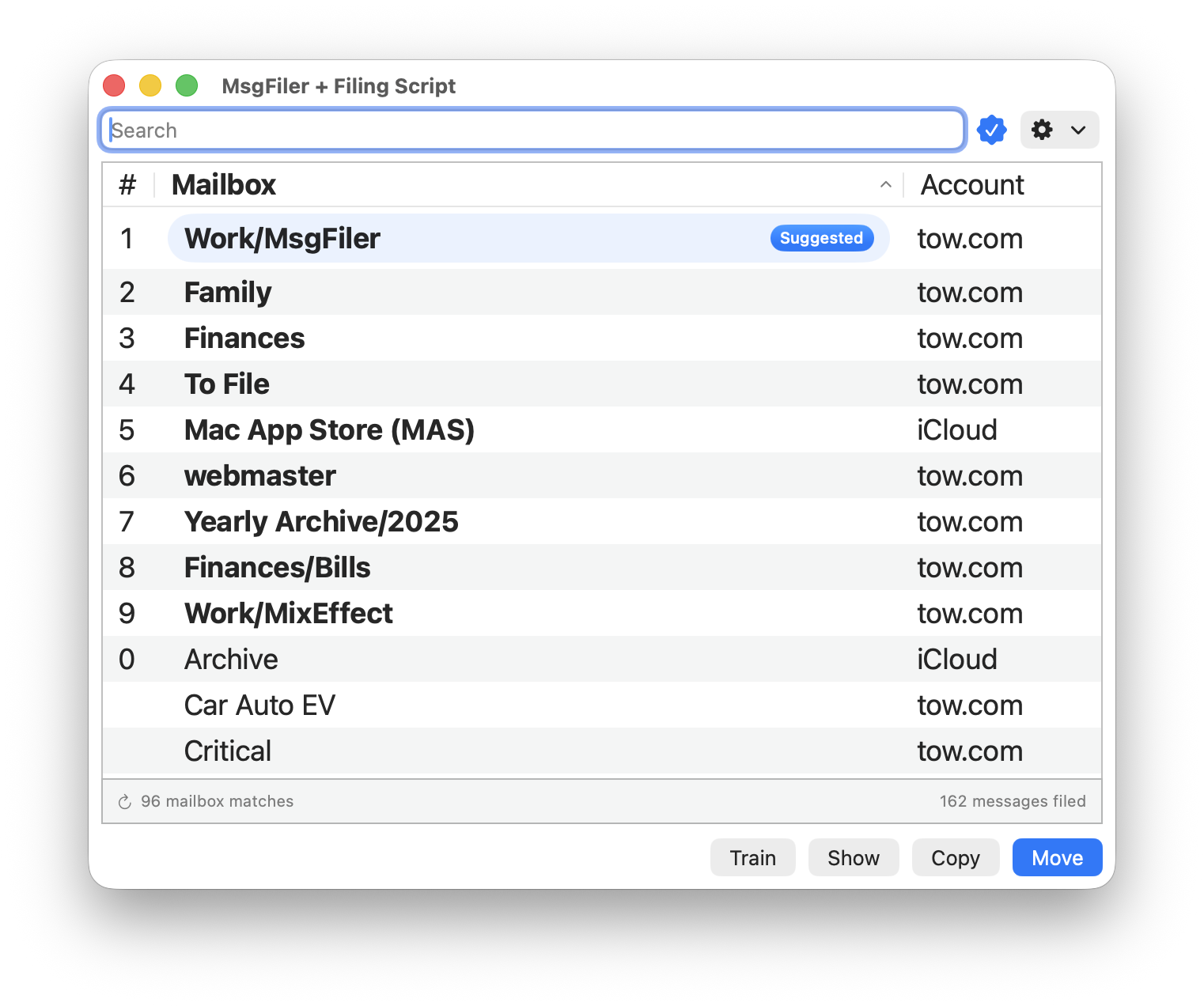
Already, Smart Suggestions has changed how I use MsgFiler. Instead of typing a few characters of the desired mailbox, MsgFiler automatically suggests it. I just have to verify it’s the first match in the mailbox list and hit Return. The system needs to be trained by filing messages into the appropriate mailbox. Metadata such as sender, recipients (for sent messages), subject, and destination mailbox are used for training; this data is stored locally and is never shared or sent to the cloud. Once trained, Smart Suggestions handles the rest. If it has high confidence on a mailbox, that mailbox jumps to the top of the list. If it can’t find a good match, nothing will be shown.
You might wonder why I didn’t just plug in Apple Intelligence to do this. In theory, an on-device language model could read the contents of each message and figure out the right mailbox. In practice, though, that approach has some big limitations. Models like Apple Intelligence have small context windows, so they can’t keep track of hundreds (or thousands) of mailboxes the way MsgFiler users often need. They’re also much slower than MsgFiler’s Smart Suggestions, which is designed to run instantly on your Mac without sending any data anywhere. And while Smart Suggestions works today across macOS Ventura, Sonoma, Sequoia, and Tahoe, Apple Intelligence is limited to Apple Silicon Macs running only macOS 26 Tahoe.
Where I see potential down the road is in lighter-weight techniques: embeddings, vector search, or classifiers fine-tuned on your own filing habits. Add in user-defined mailbox “hints” and you’d get a system that understands more context without giving up the speed and privacy that make MsgFiler so useful today.

If you’re updating to MsgFiler 4.3.0, head to Settings > Search and turn on Smart Suggestions to start training it right away. The more you use it, the smarter it gets. If you run into quirks or have ideas to make it even better, I’d love to hear from you. Smart Suggestions has already made MsgFiler feel faster and more intuitive for me, and I hope it does the same for you. Happy filing!
- MsgFiler is my productivity app for macOS that makes organizing email in Apple Mail faster and easier. Instead of dragging messages into folders, you just type a few characters of the mailbox name, hit return, and MsgFiler files the message instantly. It’s been around since 2006, trusted by Mac users for nearly two decades to tame overflowing inboxes and streamline email management. Learn more at: https://msgfiler.com.







 tow.com
Leave a comment