
Here’s a quick and un-scientific comparison between the displays on iPad Pros from 2018, 2021 (mini-LED), and 2024 (tandem OLED). I chose these three iPad Pros because they share a similar design ethos. Brightness was set to 100% and True Tone and Night Shift were all turned off on each of the iPad Pros prior to recording:
Let’s take a look at each of these screens.
2018 iPad Pro
“With precision-milled glass, advanced pixel masking, sub-pixel antialiasing and a new backlight design, the new Liquid Retina display in iPad Pro is Apple’s brightest and most color accurate iPad display, featuring wide color support, True Tone and anti-reflective coating for a natural, accurate viewing experience indoors and out. ProMotion technology automatically adjusts the display refresh rate up to 120Hz for ultra-smooth scrolling and incredible responsiveness on iPad Pro.”
— New iPad Pro with all-screen design is most advanced, powerful iPad ever
The 2018 iPad Pro clearly has the worst screen out of the three with significant yellowing. The original 12.9″ iPad Pro is much cooler and appears to be more color accurate. I have to turn on Color Filters in Accessibility and set the Intensity and Hue to the following values to correct the colors on the 2018 iPad Pro.
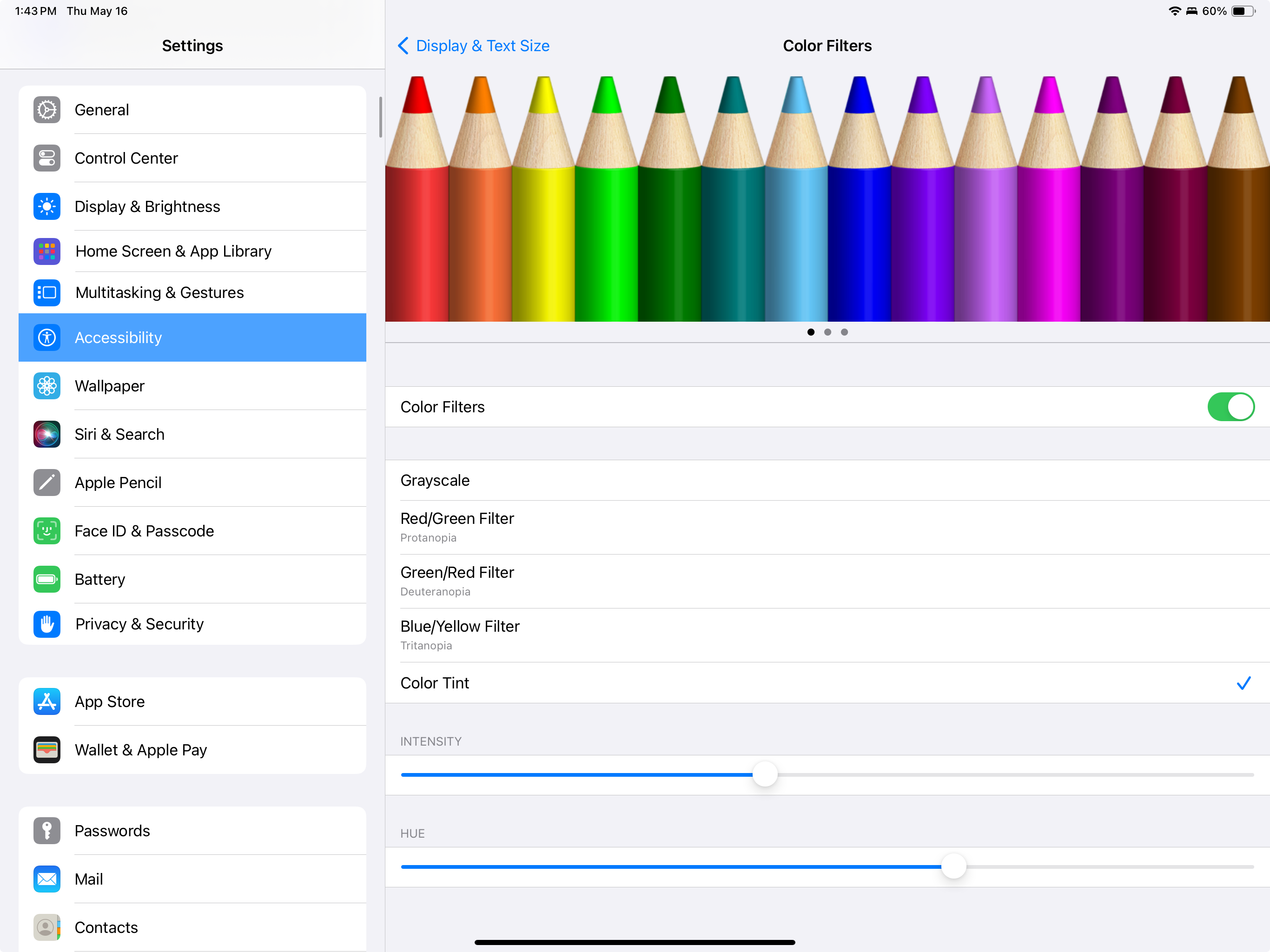
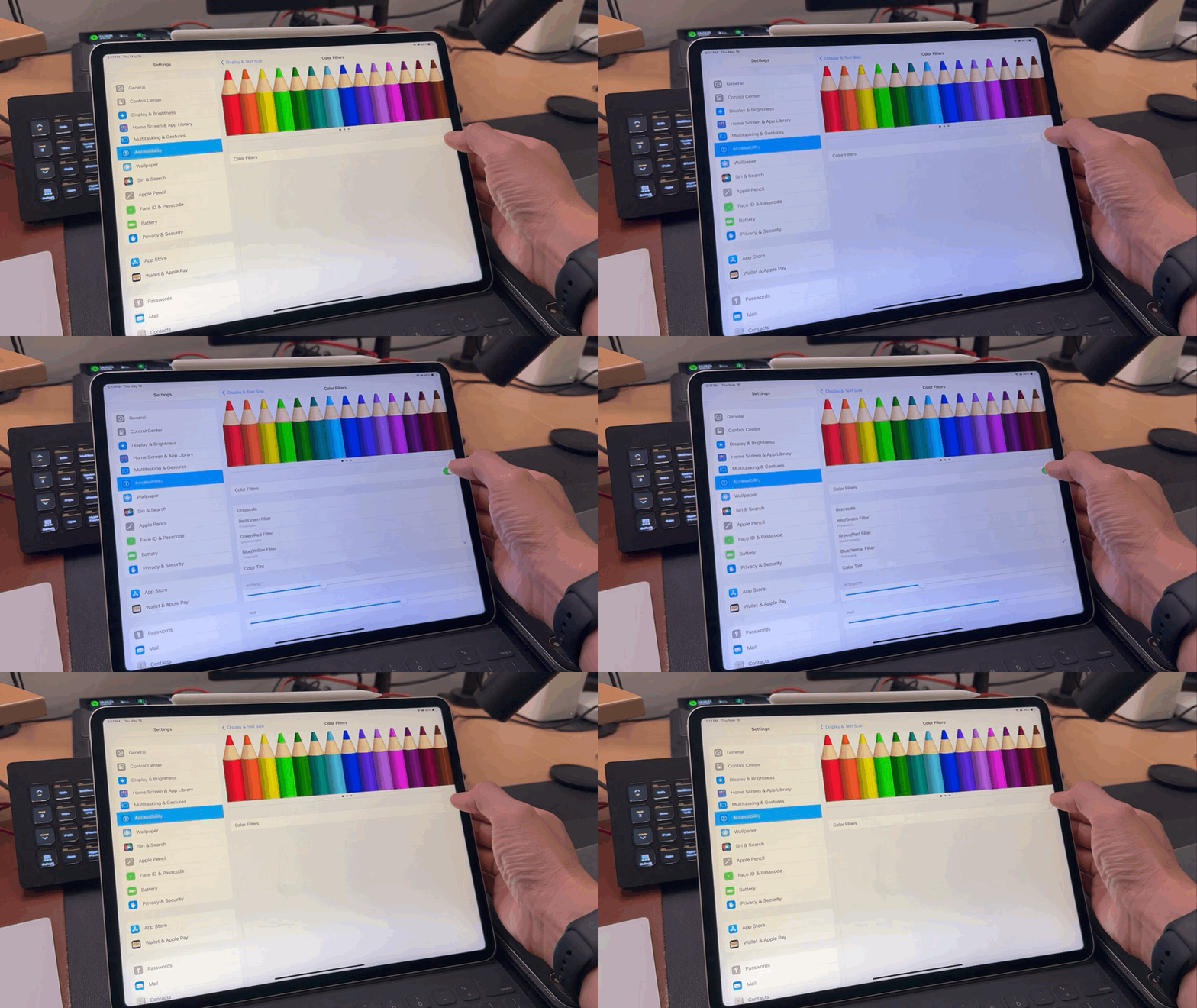
Note that doing this reduces the brightness of the display by a noticeable amount.
2021 iPad Pro
“The new Liquid Retina XDR display brings the stunning front-of-screen performance of the Pro Display XDR to the 12.9-inch iPad Pro. Engineered with a new cutting-edge mini-LED design that uses over 10,000 LEDs across the entire back of the display, the Liquid Retina XDR display features up to 1000 nits of full-screen brightness, 1600 nits of peak brightness, and a phenomenal 1 million-to-1 contrast ratio to enhance creative workflows. The result is a stunning visual experience that reflects what can be seen in the real world by capturing the brightest highlights and the most subtle details in even the darkest images. Now creative professionals, including photographers, videographers, and filmmakers, can view and edit true-to-life HDR content on a large display they can take anywhere.”
2024 iPad Pro
“The new iPad Pro debuts the Ultra Retina XDR, the world’s most advanced display, to provide an even more remarkable visual experience. The Ultra Retina XDR display features state-of-the-art tandem OLED technology that uses two OLED panels and combines the light from both to provide phenomenal full-screen brightness. The new iPad Pro supports an incredible 1000 nits of full-screen brightness for SDR and HDR content, and 1600 nits peak for HDR. No other device of its kind delivers this level of extreme dynamic range. Tandem OLED technology enables sub-millisecond control over the color and luminance of each pixel, taking XDR precision further than ever. Specular highlights in photos and video appear even brighter, and there’s more detail in shadows and low light than ever before on iPad — all while delivering even more responsiveness to content in motion.”
The differences between the mini-LED and tandem OLED are less obvious. Yes, the blacks are blacker on the tandem OLED and there is little to no blooming or light bleeding in areas where there’s high contrast. The mini-LED iPad Pro does exhibit light bleeding, but because there are so many (10,000) LEDs, it’s really restricted to those high contrast areas. My 32-inch Apple Pro Display XDR, on the other hand, has just 576 blue LEDs for light control, so I see more blooming and light bleed while working on my Mac. My 14-inch MacBook Pro has 8,040 mini-LEDs, so its display is similar to the 2021 iPad Pro.
All this to say that pixel peepers and video lovers will notice this, but I’m not so sure that the general population will be able to tell the difference between the two displays.
Should You Upgrade?
Here are my thoughts on whether you should upgrade to the M4 generation of iPad Pros, based on which model of iPad Pro you currently have.
You have a 2015-2017 iPad Pro
The original 12.9″ iPad Pro is not compared in this video, but here’s how Apple described its display in the original press release:
“iPad Pro’s 12.9-inch Retina display, with 5.6 million pixels and refined Multi-Touch technology, is the most advanced and highest resolution display ever in an iOS device. It delivers greater contrast, more uniform brightness and improved energy efficiency through photo alignment technology, oxide TFT and variable refresh rate.
— Apple Introduces iPad Pro Featuring Epic 12.9-inch Retina Display
This generation of iPad Pros cannot be upgraded past iPadOS 16, so this is a good time to upgrade. You will love the smaller and thinner design, lighter weight, fantastic screen, and the massive performance boost.
You have a 2018-2020 iPad Pro
If you like to watch videos and stream movies on your 2018-2020 iPad Pro, now may be the time to upgrade. On the other hand, if you just use your iPad Pro for productivity purposes, the 2018 model might still be fast and good enough.
Apple once admitted defeat with the trashcan Mac Pro by saying they designed themselves “into a bit of a thermal corner.” With the iPad Pros from 2018 to today, I feel like Apple has created the opposite, a sort of performance event horizon. Not dissimilar to the concept that the universe is expanding at a velocity greater than the speed of light, the iPad Pro’s hardware performance stretches out far beyond what iPadOS can offer and normal people need. Those at the performance edge will benefit from each successive iteration of the iPad Pro. Regular folk who don’t need or want to be on the bleeding edge will be fine with a hand-me-down iPad Pro or buying a used model.
You have a 2021-2022 11-inch iPad Pro
If you have an 11″ iPad Pro (4th and 5th generations), which did not come with the mini-LED of its bigger brother, the screen improvement is real, and it’s worth thinking about upgrading just for the screen alone.
You have a 2021-2022 12.9-inch iPad Pro
If the performance on your iPad is still good enough, you probably don’t need to upgrade. The mini-LED screens on these iPad Pros are already excellent, and you may not notice much of a difference in day-to-day usage.
You have an Apple Pencil
My recommendation changes if you’re an artist who uses the Apple Pencil frequently. The new Apple Pencil Pro is really nice. The squeeze and barrel roll features are very intuitive and great additions. When I was younger, I did a lot of illustration, and I wonder how my life would have been different if I had access to this as a child. Get ready to spend another $129 on the Apple Pencil Pro when you buy one of these new iPad Pros.
If you don’t have or use the Apple Pencil infrequently, my recommendation follows my notes on each individual iPad Pro above.
You have a Magic Keyboard
I’ll have more thoughts to share about the Magic Keyboard in a future post/video. The build quality is better than the previous iteration of the Magic Keyboard (which is still being sold for the M2 iPad Air lineup). As with the Apple Pencil Pro, you’re going to have to pony up an additional $349 (nearly $500 together) just to have the same set up with the new iPad Pro.
Reader Comments
Do you own an iPad Pro? Are you considering upgrading to the latest M4-powered models with the Ultra Retina XDR display, or are you planning to hold off for another year? We’d love to hear your reasons! Share your thoughts and experiences in the comments below!





 tow.com
Leave a comment